 da2f3e5102
Currently translated at 99.7% (455 of 456 strings)

Translation: th-ch/youtube-music/i18n
Translate-URL: https://hosted.weblate.org/projects/youtube-music/i18n/id/
YTMD








- Native look & feel extension, aims at keeping the original interface one click
Content
- Features
- Translation
- Download
- Themes
- Dev
- Build your own plugins
- Build
- Production Preview
- Tests
- License
- FAQ
Translation
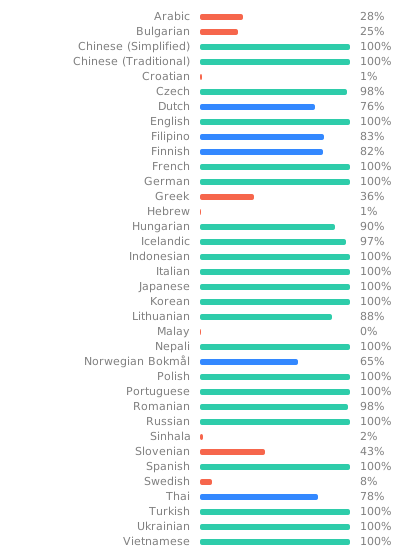
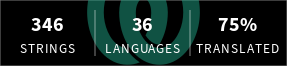
You can help with translation on Hosted Weblate.
Download
You can check out the latest release to quickly find the latest version.
Arch Linux
Install the youtube-music-bin package from the AUR. For AUR installation instructions, take a look at
this wiki page.
macOS
You can install the app using Homebrew (see the cask definition):
brew install th-ch/youtube-music/youtube-music
If you install the app manually and get an error "is damaged and can’t be opened." when launching the app, run the following in the Terminal:
/usr/bin/xattr -cr /Applications/YouTube\ Music.app
Windows
You can use the Scoop package manager to install the youtube-music package from
the extras bucket.
scoop bucket add extras
scoop install extras/youtube-music
Alternately you can use Winget, Windows 11s
official CLI package manager to install the th-ch.YouTubeMusic package.
Note: Microsoft Defender SmartScreen might block the installation since it is from an "unknown publisher". This is also true for the manual installation when trying to run the executable(.exe) after a manual download here on github (same file).
winget install th-ch.YouTubeMusic
How to install without a network connection? (in Windows)
- Download the
*.nsis.7zfile for your device architecture in release page.x64for 64-bit Windowsia32for 32-bit Windowsarm64for ARM64 Windows
- Download installer in release page. (
*-Setup.exe) - Place them in the same directory.
- Run the installer.
Themes
You can load CSS files to change the look of the application (Options > Visual Tweaks > Themes).
Some predefined themes are available in https://github.com/kerichdev/themes-for-ytmdesktop-player.
Dev
git clone https://github.com/th-ch/youtube-music
cd youtube-music
pnpm install --frozen-lockfile
pnpm dev
Build your own plugins
Using plugins, you can:
- manipulate the app - the
BrowserWindowfrom electron is passed to the plugin handler - change the front by manipulating the HTML/CSS
Creating a plugin
Create a folder in src/plugins/YOUR-PLUGIN-NAME:
index.ts: the main file of the plugin
import style from './style.css?inline'; // import style as inline

import { createPlugin } from '@/utils';

export default createPlugin({
  name: 'Plugin Label',
  restartNeeded: true, // if value is true, ytmusic show restart dialog
  config: {
    enabled: false,
  }, // your custom config
  stylesheets: [style], // your custom style,
  menu: async ({ getConfig, setConfig }) => {
    // All *Config methods are wrapped Promise<T>
    const config = await getConfig();
    return [
      {
        label: 'menu',
        submenu: [1, 2, 3].map((value) => ({
          label: `value ${value}`,
          type: 'radio',
          checked: config.value === value,
          click() {
            setConfig({ value });
          },
        })),
      },
    ];
  },
  backend: {
    start({ window, ipc }) {
      window.maximize();

      // you can communicate with renderer plugin
      ipc.handle('some-event', () => {
        return 'hello';
      });
    },
    // it fired when config changed
    onConfigChange(newConfig) { /* ... */ },
    // it fired when plugin disabled
    stop(context) { /* ... */ },
  },
  renderer: {
    async start(context) {
      console.log(await context.ipc.invoke('some-event'));
    },
    // Only renderer available hook
    onPlayerApiReady(api: YoutubePlayer, context: RendererContext) {
      // set plugin config easily
      context.setConfig({ myConfig: api.getVolume() });
    },
    onConfigChange(newConfig) { /* ... */ },
    stop(_context) { /* ... */ },
  },
  preload: {
    async start({ getConfig }) {
      const config = await getConfig();
    },
    onConfigChange(newConfig) {},
    stop(_context) {},
  },
});
Common use cases
- injecting custom CSS: create a
style.cssfile in the same folder then:
// index.ts
import style from './style.css?inline'; // import style as inline

import { createPlugin } from '@/utils';

export default createPlugin({
  name: 'Plugin Label',
  restartNeeded: true, // if value is true, ytmusic will show a restart dialog
  config: {
    enabled: false,
  }, // your custom config
  stylesheets: [style], // your custom style
  renderer() {} // define renderer hook
});
- If you want to change the HTML:
import { createPlugin } from '@/utils';

export default createPlugin({
  name: 'Plugin Label',
  restartNeeded: true, // if value is true, ytmusic will show the restart dialog
  config: {
    enabled: false,
  }, // your custom config
  renderer() {
    console.log('hello from renderer');
  } // define renderer hook
});
- communicating between the front and back: can be done using the ipcMain module from electron. See
index.tsfile and example insponsorblockplugin.
Build
- Clone the repo
- Follow this guide to install
pnpm - Run
pnpm install --frozen-lockfileto install dependencies - Run
pnpm build:OS
pnpm dist:win- Windowspnpm dist:linux- Linux (amd64)pnpm dist:linux:deb-arm64- Linux (arm64 for Debian)pnpm dist:linux:rpm-arm64- Linux (arm64 for Fedora)pnpm dist:mac- macOS (amd64)pnpm dist:mac:arm64- macOS (arm64)
Builds the app for macOS, Linux, and Windows, using electron-builder.
Production Preview
pnpm start
Tests
pnpm test
Uses Playwright to test the app.
License
MIT © th-ch
FAQ
Why apps menu isn't showing up?
If Hide Menu option is on - you can show the menu with the alt key (or ` [backtick] if using
the in-app-menu plugin)