# YouTube Music
[](https://github.com/th-ch/youtube-music/releases/)
[](https://github.com/th-ch/youtube-music/blob/master/LICENSE)
[](https://github.com/sindresorhus/xo)
[](https://GitHub.com/th-ch/youtube-music/releases/)
[](https://snyk.io/test/github/th-ch/youtube-music)
[](https://GitHub.com/th-ch/youtube-music/releases/)
[](https://aur.archlinux.org/packages/youtube-music-bin)
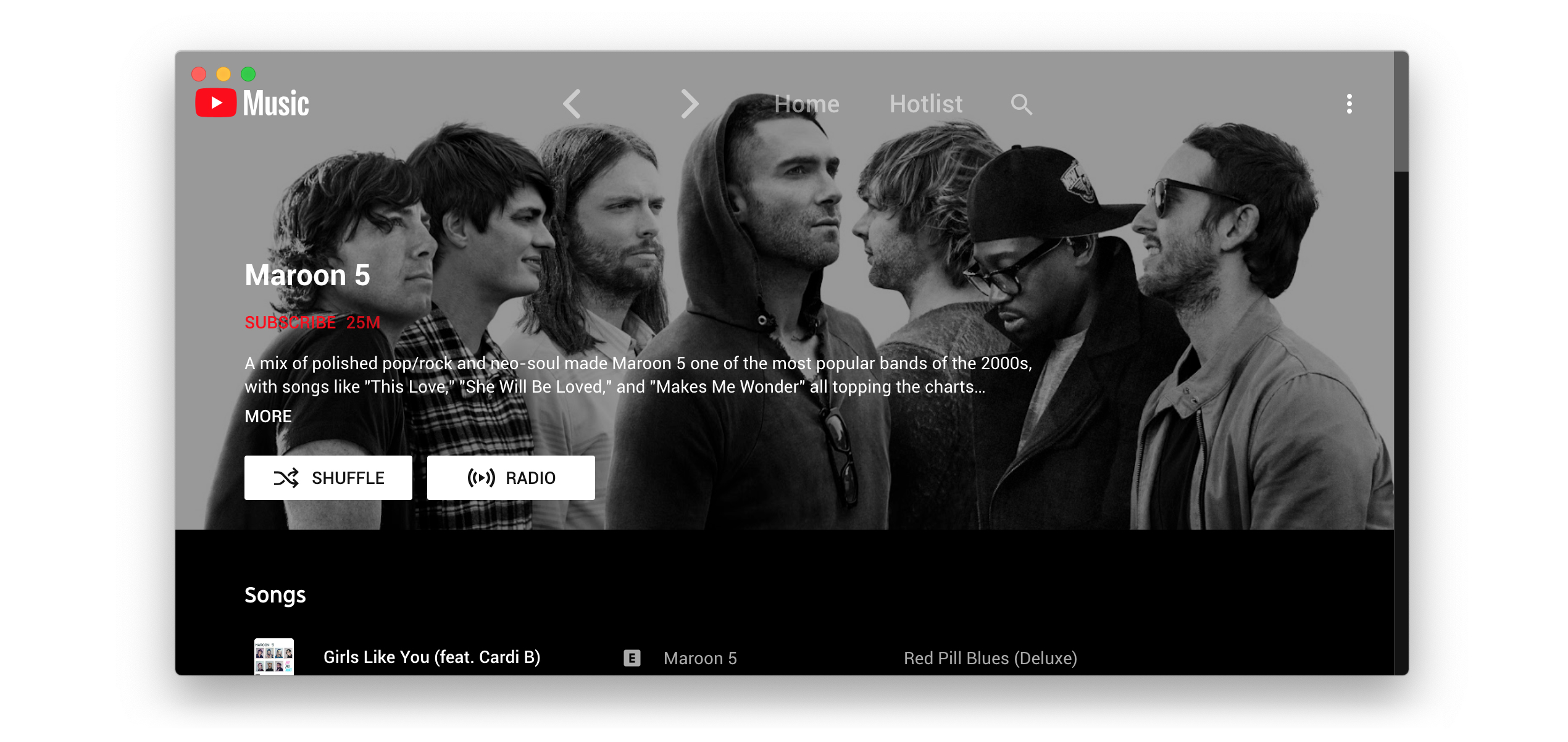

**Electron wrapper around YouTube Music featuring:**
- Native look & feel, aims at keeping the original interface
- Framework for custom plugins: change YouTube Music to your needs (style, content, features), enable/disable plugins in one click
## Download
You can check out the [latest release](https://github.com/th-ch/youtube-music/releases/latest) to quickly find the latest version.
### Arch Linux
Install the `youtube-music-bin` package from the AUR. For AUR installation instructions, take a look at this [wiki page](https://wiki.archlinux.org/index.php/Arch_User_Repository#Installing_packages).
## Available plugins:
- **Ad Blocker**: block all ads and tracking out of the box
- **Audio compressor**: apply compression to audio (lowers the volume of the loudest parts of the signal and raises the volume of the softest parts)
- **Blur navigation bar**: makes navigation bar transparent and blurry
- **Disable autoplay**: makes every song start in "paused" mode
- [**Discord**](https://discord.com/): show your friends what you listen to with [Rich Presence](https://user-images.githubusercontent.com/28219076/104362104-a7a0b980-5513-11eb-9744-bb89eabe0016.png)
- **Downloader**: downloads MP3 [directly from the interface](https://user-images.githubusercontent.com/61631665/129977677-83a7d067-c192-45e1-98ae-b5a4927393be.png) [(youtube-dl)](https://github.com/ytdl-org/youtube-dl)
- **In-app menu**: [gives bars a fancy, dark look](https://user-images.githubusercontent.com/78568641/112215894-923dbf00-8c29-11eb-95c3-3ce15db27eca.png)
> (see [this post](https://github.com/th-ch/youtube-music/issues/410#issuecomment-952060709) if you have problem accessing the menu after enabling this plugin and hide-menu option)
- [**Last.fm**](https://www.last.fm/): scrobbles support
- **Navigation**: next/back navigation arrows directly integrated in the interface, like in your favorite browser
- **No Google Login**: remove Google login buttons and links from the interface
- **Notifications**: display a notification when a song starts playing ([interactive notifications](https://user-images.githubusercontent.com/78568641/114102651-63ce0e00-98d0-11eb-9dfe-c5a02bb54f9c.png) are available on windows)
- **Playback speed**: listen fast, listen slow! [Adds a slider that controls song speed](https://user-images.githubusercontent.com/61631665/129976003-e55db5ba-bf42-448c-a059-26a009775e68.png)
- **Precise volume**: customizable volume steps for more comfort, allows controlling the volume precisely using mousewheel
- **Quality changer**: Allows changing the video quality with a [button](https://user-images.githubusercontent.com/78568641/138574366-70324a5e-2d64-4f6a-acdd-dc2a2b9cecc5.png) on the video overlay
- **Shortcuts**: Allows setting global hotkeys for playback (play/pause/next/previous) + disable [media osd](https://user-images.githubusercontent.com/84923831/128601225-afa38c1f-dea8-4209-9f72-0f84c1dd8b54.png) by overriding media keys + enable Ctrl/CMD + F to search + enable linux mpris support for mediakeys + [custom hotkeys](https://github.com/Araxeus/youtube-music/blob/1e591d6a3df98449bcda6e63baab249b28026148/providers/song-controls.js#L13-L50) for [advanced users](https://github.com/th-ch/youtube-music/issues/106#issuecomment-952156902)
- [**SponsorBlock**](https://github.com/ajayyy/SponsorBlock): skips non-music parts
- **Taskbar media control**: control playback from your [Windows taskbar](https://user-images.githubusercontent.com/78568641/111916130-24a35e80-8a82-11eb-80c8-5021c1aa27f4.png)
- **Touchbar**: custom TouchBar layout for macOS
- **Video Toggle**: Adds a button to switch between Video/Song mode. can also optionally remove the whole video tab
---
- **Auto confirm when paused** (Always Enabled): disable the ["Continue Watching?"](https://user-images.githubusercontent.com/61631665/129977894-01c60740-7ec6-4bf0-9a2c-25da24491b0e.png) popup that pause music after a certain time
> If using `Hide Menu` option - you can show the menu with the `alt` key (or `escape` if using the in-app-menu plugin)
## Dev
```sh
git clone https://github.com/th-ch/youtube-music
cd youtube-music
yarn
yarn start
```
## Build your own plugins
Using plugins, you can:
- manipulate the app - the `BrowserWindow` from electron is passed to the plugin handler
- change the front by manipulating the HTML/CSS
### Creating a plugin
Create a folder in `plugins/YOUR-PLUGIN-NAME`:
- if you need to manipulate the BrowserWindow, create a file `back.js` with the following template:
```node
module.exports = win => {
// win is the BrowserWindow object
};
```
- if you need to change the front, create a file `front.js` with the following template:
```node
module.exports = () => {
// This function will be called as a preload script
// So you can use front features like `document.querySelector`
};
```
### Common use cases
- injecting custom CSS: create a `style.css` file in the same folder then:
```node
const path = require("path");
const { injectCSS } = require("../utils");
// back.js
module.exports = win => {
injectCSS(win.webContents, path.join(__dirname, "style.css"));
};
```
- changing the HTML:
```node
// front.js
module.exports = () => {
// Remove the login button
document.querySelector(".sign-in-link.ytmusic-nav-bar").remove();
};
```
- communicating between the front and back: can be done using the ipcMain module from electron. See `utils.js` file and example in `navigation` plugin.
## Build
```sh
yarn build
```
Builds the app for macOS, Linux, and Windows, using [electron-builder](https://github.com/electron-userland/electron-builder).
## Tests
```sh
yarn test
```
Uses [Spectron](https://www.electronjs.org/spectron) to test the app.
## License
MIT © [th-ch](https://github.com/th-ch/youtube-music)