# YouTube Music
[](https://github.com/th-ch/youtube-music/releases/)
[](https://github.com/th-ch/youtube-music/blob/master/LICENSE)
[](https://github.com/th-ch/youtube-music/blob/master/.eslintrc.js)
[](https://GitHub.com/th-ch/youtube-music/releases/)
[](https://GitHub.com/th-ch/youtube-music/releases/)
[](https://aur.archlinux.org/packages/youtube-music-bin)
[](https://snyk.io/test/github/th-ch/youtube-music)

Read this in other languages: [🇰🇷](./docs/readme/README-ko.md)
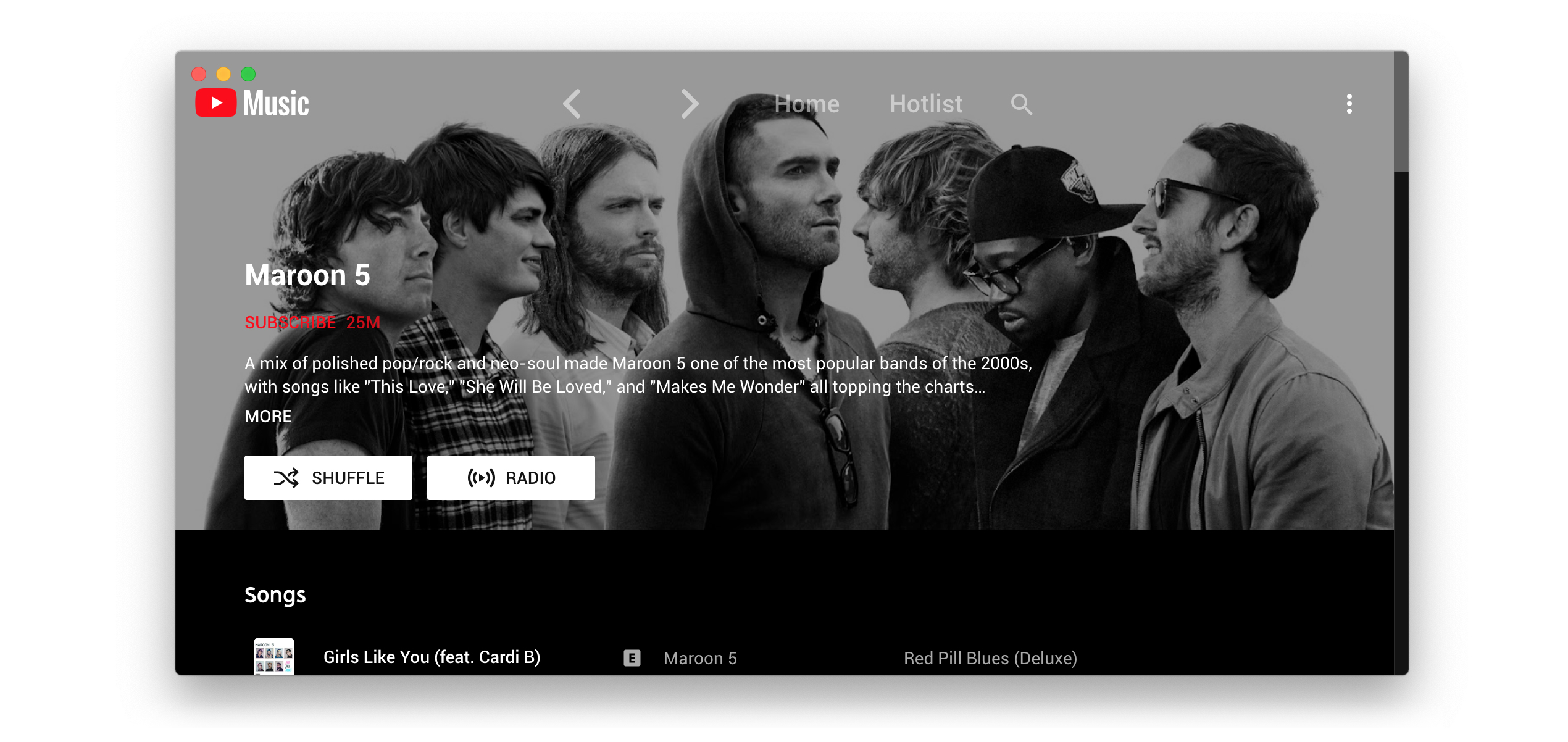
**Electron wrapper around YouTube Music featuring:**
- Native look & feel, aims at keeping the original interface
- Framework for custom plugins: change YouTube Music to your needs (style, content, features), enable/disable plugins in
one click
## Demo Image
| Player Screen (album color theme & ambient light) |
|:---------------------------------------------------------------------------------------------------------:|
||
## Translation
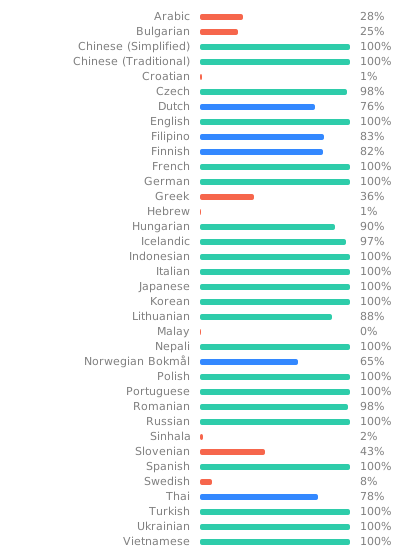
You can help with translation on [Hosted Weblate](https://hosted.weblate.org/projects/youtube-music/).
 ## Download
You can check out the [latest release](https://github.com/th-ch/youtube-music/releases/latest) to quickly find the
latest version.
### Arch Linux
Install the `youtube-music-bin` package from the AUR. For AUR installation instructions, take a look at
this [wiki page](https://wiki.archlinux.org/index.php/Arch_User_Repository#Installing_packages).
### MacOS
You can install the app using Homebrew (see the [cask definition](https://github.com/th-ch/homebrew-youtube-music)):
```bash
brew install th-ch/youtube-music/youtube-music
```
If you install the app manually and get an error "is damaged and can’t be opened." when launching the app, run the following in the Terminal:
```bash
xattr -cr /Applications/YouTube\ Music.app
```
### Windows
You can use the [Scoop package manager](https://scoop.sh) to install the `youtube-music` package from
the [`extras` bucket](https://github.com/ScoopInstaller/Extras).
```bash
scoop bucket add extras
scoop install extras/youtube-music
```
Alternately you can use [Winget](https://learn.microsoft.com/en-us/windows/package-manager/winget/), Windows 11s
official CLI package manager to install the `th-ch.YouTubeMusic` package.
*Note: Microsoft Defender SmartScreen might block the installation since it is from an "unknown publisher". This is also
true for the manual installation when trying to run the executable(.exe) after a manual download here on github (same
file).*
```bash
winget install th-ch.YouTubeMusic
```
#### How to install without a network connection? (in Windows)
- Download the `*.nsis.7z` file for _your device architecture_ in [release page](https://github.com/th-ch/youtube-music/releases/latest).
- `x64` for 64-bit Windows
- `ia32` for 32-bit Windows
- `arm64` for ARM64 Windows
- Download installer in release page. (`*-Setup.exe`)
- Place them in the **same directory**.
- Run the installer.
## Features:
- **Auto confirm when paused** (Always Enabled): disable
the ["Continue Watching?"](https://user-images.githubusercontent.com/61631665/129977894-01c60740-7ec6-4bf0-9a2c-25da24491b0e.png)
popup that pause music after a certain time
- And more ...
## Available plugins:
- **Ad Blocker**: Block all ads and tracking out of the box
- **Album Color Theme**: Applies a dynamic theme and visual effects based on the album color palette
- **Ambient Mode**: Applies a lighting effect by casting gentle colors from the video, into your screen’s background.
- **Audio Compressor**: Apply compression to audio (lowers the volume of the loudest parts of the signal and raises the
volume of the softest parts)
- **Blur Nav Bar**: makes navigation bar transparent and blurry
- **Bypass age restrictions**: bypass YouTube's age verification
- **Captions selector**: Enable captions
- **Compact sidebar**: Always set the sidebar in compact mode
- **Crossfade**: Crossfade between songs
- **Disable Autoplay**: Makes every song start in "paused" mode
- [**Discord**](https://discord.com/): Show your friends what you listen to
with [Rich Presence](https://user-images.githubusercontent.com/28219076/104362104-a7a0b980-5513-11eb-9744-bb89eabe0016.png)
- **Downloader**: downloads
MP3 [directly from the interface](https://user-images.githubusercontent.com/61631665/129977677-83a7d067-c192-45e1-98ae-b5a4927393be.png) [(youtube-dl)](https://github.com/ytdl-org/youtube-dl)
- **Exponential Volume**: Makes the volume
slider [exponential](https://greasyfork.org/en/scripts/397686-youtube-music-fix-volume-ratio/) so it's easier to
select lower volumes.
- **In-App Menu**: [gives bars a fancy, dark look](https://user-images.githubusercontent.com/78568641/112215894-923dbf00-8c29-11eb-95c3-3ce15db27eca.png)
> (see [this post](https://github.com/th-ch/youtube-music/issues/410#issuecomment-952060709) if you have problem
accessing the menu after enabling this plugin and hide-menu option)
- [**Last.fm**](https://www.last.fm/): Scrobbles support
- **Lumia Stream**: Adds [Lumia Stream](https://lumiastream.com/) support
- **Lyrics Genius**: Adds lyrics support for most songs
- **Navigation**: Next/Back navigation arrows directly integrated in the interface, like in your favorite browser
- **No Google Login**: Remove Google login buttons and links from the interface
- **Notifications**: Display a notification when a song starts
playing ([interactive notifications](https://user-images.githubusercontent.com/78568641/114102651-63ce0e00-98d0-11eb-9dfe-c5a02bb54f9c.png)
are available on windows)
- **Picture in picture**: allows to switch the app to picture-in-picture mode
- **Playback Speed**: Listen fast, listen
slow! [Adds a slider that controls song speed](https://user-images.githubusercontent.com/61631665/129976003-e55db5ba-bf42-448c-a059-26a009775e68.png)
- **Precise Volume**: Control the volume precisely using mousewheel/hotkeys, with a custom hud and customizable volume
steps
- **Quality Changer**: Allows changing the video quality with
a [button](https://user-images.githubusercontent.com/78568641/138574366-70324a5e-2d64-4f6a-acdd-dc2a2b9cecc5.png) on
the video overlay
- **Shortcuts**: Allows setting global hotkeys for playback (play/pause/next/previous) +
disable [media osd](https://user-images.githubusercontent.com/84923831/128601225-afa38c1f-dea8-4209-9f72-0f84c1dd8b54.png)
by overriding media keys + enable Ctrl/CMD + F to search + enable linux mpris support for
mediakeys + [custom hotkeys](https://github.com/Araxeus/youtube-music/blob/1e591d6a3df98449bcda6e63baab249b28026148/providers/song-controls.js#L13-L50)
for [advanced users](https://github.com/th-ch/youtube-music/issues/106#issuecomment-952156902)
- **Skip-Silences** - Automatically skip silenced sections
- [**SponsorBlock**](https://github.com/ajayyy/SponsorBlock): Automatically Skips non-music parts like intro/outro or
parts of music videos where the song isn't playing
- **Taskbar Media Control**: Control playback from
your [Windows taskbar](https://user-images.githubusercontent.com/78568641/111916130-24a35e80-8a82-11eb-80c8-5021c1aa27f4.png)
- **Touchbar**: Custom TouchBar layout for macOS
- **Tuna-OBS**: Integration with [OBS](https://obsproject.com/)'s
plugin [Tuna](https://obsproject.com/forum/resources/tuna.843/)
- **Video Toggle**: Adds
a [button](https://user-images.githubusercontent.com/28893833/173663950-63e6610e-a532-49b7-9afa-54cb57ddfc15.png) to
switch between Video/Song mode. can also optionally remove the whole video tab
- **Visualizer**: Different music visualizers
## Themes
You can load CSS files to change the look of the application (Options > Visual Tweaks > Themes).
Some predefined themes are available in https://github.com/kerichdev/themes-for-ytmdesktop-player.
## Dev
```bash
git clone https://github.com/th-ch/youtube-music
cd youtube-music
pnpm install --frozen-lockfile
pnpm dev
```
## Build your own plugins
Using plugins, you can:
- manipulate the app - the `BrowserWindow` from electron is passed to the plugin handler
- change the front by manipulating the HTML/CSS
### Creating a plugin
Create a folder in `plugins/YOUR-PLUGIN-NAME`:
- `index.ts`: the main file of the plugin
```typescript
import style from './style.css?inline'; // import style as inline
import { createPlugin } from '@/utils';
export default createPlugin({
name: 'Plugin Label',
restartNeeded: true, // if value is true, ytmusic show restart dialog
config: {
enabled: false,
}, // your custom config
stylesheets: [style], // your custom style,
menu: async ({ getConfig, setConfig }) => {
// All *Config methods are wrapped Promise
const config = await getConfig();
return [
{
label: 'menu',
submenu: [1, 2, 3].map((value) => ({
label: `value ${value}`,
type: 'radio',
checked: config.value === value,
click() {
setConfig({ value });
},
})),
},
];
},
backend: {
start({ window, ipc }) {
window.maximize();
// you can communicate with renderer plugin
ipc.handle('some-event', () => {
return 'hello';
});
},
// it fired when config changed
onConfigChange(newConfig) { /* ... */ },
// it fired when plugin disabled
stop(context) { /* ... */ },
},
renderer: {
async start(context) {
console.log(await context.ipc.invoke('some-event'));
},
// Only renderer available hook
onPlayerApiReady(api: YoutubePlayer, context: RendererContext) {
// set plugin config easily
context.setConfig({ myConfig: api.getVolume() });
},
onConfigChange(newConfig) { /* ... */ },
stop(_context) { /* ... */ },
},
preload: {
async start({ getConfig }) {
const config = await getConfig();
},
onConfigChange(newConfig) {},
stop(_context) {},
},
});
```
### Common use cases
- injecting custom CSS: create a `style.css` file in the same folder then:
```typescript
// index.ts
import style from './style.css?inline'; // import style as inline
import { createPlugin } from '@/utils';
export default createPlugin({
name: 'Plugin Label',
restartNeeded: true, // if value is true, ytmusic will show a restart dialog
config: {
enabled: false,
}, // your custom config
stylesheets: [style], // your custom style
renderer() {} // define renderer hook
});
```
- If you want to change the HTML:
```typescript
import { createPlugin } from '@/utils';
export default createPlugin({
name: 'Plugin Label',
restartNeeded: true, // if value is true, ytmusic will show the restart dialog
config: {
enabled: false,
}, // your custom config
renderer() {
// Remove the login button
document.querySelector(".sign-in-link.ytmusic-nav-bar").remove();
} // define renderer hook
});
```
- communicating between the front and back: can be done using the ipcMain module from electron. See `index.ts` file and
example in `sponsorblock` plugin.
## Build
1. Clone the repo
2. Follow [this guide](https://pnpm.io/installation) to install `pnpm`
3. Run `pnpm install --frozen-lockfile` to install dependencies
4. Run `pnpm build:OS`
- `pnpm dist:win` - Windows
- `pnpm dist:linux` - Linux
- `pnpm dist:mac` - MacOS
Builds the app for macOS, Linux, and Windows,
using [electron-builder](https://github.com/electron-userland/electron-builder).
## Production Preview
```bash
pnpm start
```
## Tests
```bash
pnpm test
```
Uses [Playwright](https://playwright.dev/) to test the app.
## License
MIT © [th-ch](https://github.com/th-ch/youtube-music)
## Most asked questions
### Why apps menu isn't showing up?
If `Hide Menu` option is on - you can show the menu with the alt key (or \` [backtick] if using
the in-app-menu plugin)
## Download
You can check out the [latest release](https://github.com/th-ch/youtube-music/releases/latest) to quickly find the
latest version.
### Arch Linux
Install the `youtube-music-bin` package from the AUR. For AUR installation instructions, take a look at
this [wiki page](https://wiki.archlinux.org/index.php/Arch_User_Repository#Installing_packages).
### MacOS
You can install the app using Homebrew (see the [cask definition](https://github.com/th-ch/homebrew-youtube-music)):
```bash
brew install th-ch/youtube-music/youtube-music
```
If you install the app manually and get an error "is damaged and can’t be opened." when launching the app, run the following in the Terminal:
```bash
xattr -cr /Applications/YouTube\ Music.app
```
### Windows
You can use the [Scoop package manager](https://scoop.sh) to install the `youtube-music` package from
the [`extras` bucket](https://github.com/ScoopInstaller/Extras).
```bash
scoop bucket add extras
scoop install extras/youtube-music
```
Alternately you can use [Winget](https://learn.microsoft.com/en-us/windows/package-manager/winget/), Windows 11s
official CLI package manager to install the `th-ch.YouTubeMusic` package.
*Note: Microsoft Defender SmartScreen might block the installation since it is from an "unknown publisher". This is also
true for the manual installation when trying to run the executable(.exe) after a manual download here on github (same
file).*
```bash
winget install th-ch.YouTubeMusic
```
#### How to install without a network connection? (in Windows)
- Download the `*.nsis.7z` file for _your device architecture_ in [release page](https://github.com/th-ch/youtube-music/releases/latest).
- `x64` for 64-bit Windows
- `ia32` for 32-bit Windows
- `arm64` for ARM64 Windows
- Download installer in release page. (`*-Setup.exe`)
- Place them in the **same directory**.
- Run the installer.
## Features:
- **Auto confirm when paused** (Always Enabled): disable
the ["Continue Watching?"](https://user-images.githubusercontent.com/61631665/129977894-01c60740-7ec6-4bf0-9a2c-25da24491b0e.png)
popup that pause music after a certain time
- And more ...
## Available plugins:
- **Ad Blocker**: Block all ads and tracking out of the box
- **Album Color Theme**: Applies a dynamic theme and visual effects based on the album color palette
- **Ambient Mode**: Applies a lighting effect by casting gentle colors from the video, into your screen’s background.
- **Audio Compressor**: Apply compression to audio (lowers the volume of the loudest parts of the signal and raises the
volume of the softest parts)
- **Blur Nav Bar**: makes navigation bar transparent and blurry
- **Bypass age restrictions**: bypass YouTube's age verification
- **Captions selector**: Enable captions
- **Compact sidebar**: Always set the sidebar in compact mode
- **Crossfade**: Crossfade between songs
- **Disable Autoplay**: Makes every song start in "paused" mode
- [**Discord**](https://discord.com/): Show your friends what you listen to
with [Rich Presence](https://user-images.githubusercontent.com/28219076/104362104-a7a0b980-5513-11eb-9744-bb89eabe0016.png)
- **Downloader**: downloads
MP3 [directly from the interface](https://user-images.githubusercontent.com/61631665/129977677-83a7d067-c192-45e1-98ae-b5a4927393be.png) [(youtube-dl)](https://github.com/ytdl-org/youtube-dl)
- **Exponential Volume**: Makes the volume
slider [exponential](https://greasyfork.org/en/scripts/397686-youtube-music-fix-volume-ratio/) so it's easier to
select lower volumes.
- **In-App Menu**: [gives bars a fancy, dark look](https://user-images.githubusercontent.com/78568641/112215894-923dbf00-8c29-11eb-95c3-3ce15db27eca.png)
> (see [this post](https://github.com/th-ch/youtube-music/issues/410#issuecomment-952060709) if you have problem
accessing the menu after enabling this plugin and hide-menu option)
- [**Last.fm**](https://www.last.fm/): Scrobbles support
- **Lumia Stream**: Adds [Lumia Stream](https://lumiastream.com/) support
- **Lyrics Genius**: Adds lyrics support for most songs
- **Navigation**: Next/Back navigation arrows directly integrated in the interface, like in your favorite browser
- **No Google Login**: Remove Google login buttons and links from the interface
- **Notifications**: Display a notification when a song starts
playing ([interactive notifications](https://user-images.githubusercontent.com/78568641/114102651-63ce0e00-98d0-11eb-9dfe-c5a02bb54f9c.png)
are available on windows)
- **Picture in picture**: allows to switch the app to picture-in-picture mode
- **Playback Speed**: Listen fast, listen
slow! [Adds a slider that controls song speed](https://user-images.githubusercontent.com/61631665/129976003-e55db5ba-bf42-448c-a059-26a009775e68.png)
- **Precise Volume**: Control the volume precisely using mousewheel/hotkeys, with a custom hud and customizable volume
steps
- **Quality Changer**: Allows changing the video quality with
a [button](https://user-images.githubusercontent.com/78568641/138574366-70324a5e-2d64-4f6a-acdd-dc2a2b9cecc5.png) on
the video overlay
- **Shortcuts**: Allows setting global hotkeys for playback (play/pause/next/previous) +
disable [media osd](https://user-images.githubusercontent.com/84923831/128601225-afa38c1f-dea8-4209-9f72-0f84c1dd8b54.png)
by overriding media keys + enable Ctrl/CMD + F to search + enable linux mpris support for
mediakeys + [custom hotkeys](https://github.com/Araxeus/youtube-music/blob/1e591d6a3df98449bcda6e63baab249b28026148/providers/song-controls.js#L13-L50)
for [advanced users](https://github.com/th-ch/youtube-music/issues/106#issuecomment-952156902)
- **Skip-Silences** - Automatically skip silenced sections
- [**SponsorBlock**](https://github.com/ajayyy/SponsorBlock): Automatically Skips non-music parts like intro/outro or
parts of music videos where the song isn't playing
- **Taskbar Media Control**: Control playback from
your [Windows taskbar](https://user-images.githubusercontent.com/78568641/111916130-24a35e80-8a82-11eb-80c8-5021c1aa27f4.png)
- **Touchbar**: Custom TouchBar layout for macOS
- **Tuna-OBS**: Integration with [OBS](https://obsproject.com/)'s
plugin [Tuna](https://obsproject.com/forum/resources/tuna.843/)
- **Video Toggle**: Adds
a [button](https://user-images.githubusercontent.com/28893833/173663950-63e6610e-a532-49b7-9afa-54cb57ddfc15.png) to
switch between Video/Song mode. can also optionally remove the whole video tab
- **Visualizer**: Different music visualizers
## Themes
You can load CSS files to change the look of the application (Options > Visual Tweaks > Themes).
Some predefined themes are available in https://github.com/kerichdev/themes-for-ytmdesktop-player.
## Dev
```bash
git clone https://github.com/th-ch/youtube-music
cd youtube-music
pnpm install --frozen-lockfile
pnpm dev
```
## Build your own plugins
Using plugins, you can:
- manipulate the app - the `BrowserWindow` from electron is passed to the plugin handler
- change the front by manipulating the HTML/CSS
### Creating a plugin
Create a folder in `plugins/YOUR-PLUGIN-NAME`:
- `index.ts`: the main file of the plugin
```typescript
import style from './style.css?inline'; // import style as inline
import { createPlugin } from '@/utils';
export default createPlugin({
name: 'Plugin Label',
restartNeeded: true, // if value is true, ytmusic show restart dialog
config: {
enabled: false,
}, // your custom config
stylesheets: [style], // your custom style,
menu: async ({ getConfig, setConfig }) => {
// All *Config methods are wrapped Promise
const config = await getConfig();
return [
{
label: 'menu',
submenu: [1, 2, 3].map((value) => ({
label: `value ${value}`,
type: 'radio',
checked: config.value === value,
click() {
setConfig({ value });
},
})),
},
];
},
backend: {
start({ window, ipc }) {
window.maximize();
// you can communicate with renderer plugin
ipc.handle('some-event', () => {
return 'hello';
});
},
// it fired when config changed
onConfigChange(newConfig) { /* ... */ },
// it fired when plugin disabled
stop(context) { /* ... */ },
},
renderer: {
async start(context) {
console.log(await context.ipc.invoke('some-event'));
},
// Only renderer available hook
onPlayerApiReady(api: YoutubePlayer, context: RendererContext) {
// set plugin config easily
context.setConfig({ myConfig: api.getVolume() });
},
onConfigChange(newConfig) { /* ... */ },
stop(_context) { /* ... */ },
},
preload: {
async start({ getConfig }) {
const config = await getConfig();
},
onConfigChange(newConfig) {},
stop(_context) {},
},
});
```
### Common use cases
- injecting custom CSS: create a `style.css` file in the same folder then:
```typescript
// index.ts
import style from './style.css?inline'; // import style as inline
import { createPlugin } from '@/utils';
export default createPlugin({
name: 'Plugin Label',
restartNeeded: true, // if value is true, ytmusic will show a restart dialog
config: {
enabled: false,
}, // your custom config
stylesheets: [style], // your custom style
renderer() {} // define renderer hook
});
```
- If you want to change the HTML:
```typescript
import { createPlugin } from '@/utils';
export default createPlugin({
name: 'Plugin Label',
restartNeeded: true, // if value is true, ytmusic will show the restart dialog
config: {
enabled: false,
}, // your custom config
renderer() {
// Remove the login button
document.querySelector(".sign-in-link.ytmusic-nav-bar").remove();
} // define renderer hook
});
```
- communicating between the front and back: can be done using the ipcMain module from electron. See `index.ts` file and
example in `sponsorblock` plugin.
## Build
1. Clone the repo
2. Follow [this guide](https://pnpm.io/installation) to install `pnpm`
3. Run `pnpm install --frozen-lockfile` to install dependencies
4. Run `pnpm build:OS`
- `pnpm dist:win` - Windows
- `pnpm dist:linux` - Linux
- `pnpm dist:mac` - MacOS
Builds the app for macOS, Linux, and Windows,
using [electron-builder](https://github.com/electron-userland/electron-builder).
## Production Preview
```bash
pnpm start
```
## Tests
```bash
pnpm test
```
Uses [Playwright](https://playwright.dev/) to test the app.
## License
MIT © [th-ch](https://github.com/th-ch/youtube-music)
## Most asked questions
### Why apps menu isn't showing up?
If `Hide Menu` option is on - you can show the menu with the alt key (or \` [backtick] if using
the in-app-menu plugin)